How to Get the Best Performance From Your WiFi Router
Advertisement

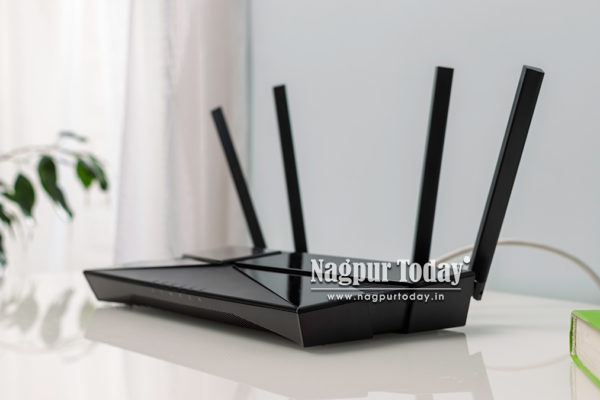 A WiFi router is the heart of your home or office network, as it connects all your devices to the internet and ensures that everything runs smoothly. Through your WiFi router, you can connect to the internet to browse the web, stream movies, attend video meetings, play games online, and manage your smart home devices.
The quality of your internet experience depends very much on your WiFi router, even when you are subscribed to a high-speed internet plan. If the router is not properly configured or maintained through 192.168.1.1, you won’t be able to enjoy the best internet experience, despite being on a high-speed internet plan.
After installing the WiFi router, you need to optimize your WiFi router by taking into consideration factors like router placement, outdated firmware, network congestion, interference, and aging hardware, so that you can get the best performance.
Gold Rate
July 02 ,2026 – Time 10.30Hrs
Gold 24 KT
₹ 1 43,100 /-
Gold 22 KT
₹ 1,32,800 /-
Silver/Kg
₹ 2,30,500/-
Platinum
₹ 88,000/-
Recommended rate for Nagpur sarafa Making charges minimum 13% and above

Optimizing your WiFi router is easy and doesn’t require expensive upgrades. With that said, let us explore some practical ways to optimize your WiFi router so that you can get the best performance from it.
1. Place Your Router in the Best Possible Location
One of the simplest yet most effective ways to optimize your WiFi router is by placing the router in the best possible location. The location of your WiFi router directly affects the performance of your WiFi network. The best possible placement of a WiFi router involves placing the router in a central location, elevated from the ground on a shelf or table, with no metallic objects or electrical appliances nearby.
Advertisement

Placing the router centrally and elevated from the ground ensures that WiFi signals are distributed evenly in all directions and the chances of signal obstruction are minimal. Avoid positioning the router at one end of the house, inside cabinets, behind large furniture, or near thick concrete walls, as all of these will weaken the coverage and ultimately the performance of the WiFi network.
2. Keep Your Router Firmware Updated
Like your laptop and smartphone, WiFi routers also run on operating systems, which are generally called firmware. WiFi routers receive firmware updates regularly from manufacturers to improve performance, fix software bugs, enhance security, and sometimes introduce new features. Unfortunately, many users never update their router firmware after installation.
Running an old or outdated firmware can not only reduce the performance of the WiFi network but also expose your network to security threats. Most modern routers allow users to check for firmware updates through their web interface, i.e., 192.168.0.1 or mobile app, while others even install updates automatically.
You should regularly check for firmware updates and ensure that your router operates efficiently.
3. Reduce Wireless Interference
Wireless interference is one of the biggest causes why many WiFi routers don’t perform as expected. WiFi signals are transmitted through radio frequencies, which are used by many household electronics as well. Electronic devices such as microwave ovens, cordless phones, baby monitors, Bluetooth devices, and neighbouring WiFi networks can all create interference. This interference can reduce the signal quality and lead to slower speeds and unstable connections.
This interference can be minimised by using the dual-band or tri-band transmission feature. By using the dual-band or tri-band transmission feature, your router transmits the WiFi signals using two different frequency bands, the 2.4 GHz band and the 5 GHz band. You can connect compatible devices to the 5 GHz band to improve performance and maintain optimal network performance.
4. Manage Connected Devices
Households today have dozens of connected devices, including smartphones, laptops, tablets, gaming consoles, smart TVs, streaming devices, voice assistants, printers, and smart home products. Each connected device to the network consumes a portion of network resources, even when it is not being used.
As the number of connected devices increases, the amount of available bandwidth and other resources decreases, leading to slower internet. Review the list of devices connected to your WiFi router and disconnect any devices that are no longer needed or being used. Doing so will reduce unnecessary traffic and improve overall performance of the network.
Advertisement


LIVE | NEWS BULLETIN NAGPUR TODAY

दुकान के बोर्ड को लेकर विवाद #nagpurnews #viral #vivad #crime #marpeet #latestnews

Nagpur’s Emerging Markets: Opportunities, Challenges & Future Growth | Interview with Pankaj…

इंस्टाग्राम फ्रेंडशिप बनी खूनी टकराव की वजह… #nagpurnews #crime #instagram #friendship #latestnews

कमाल चौक स्थित हैमर्स कैफे पर पांचपावली पुलिस का छापा #nagpurnews #hukka…

₹50 के विवाद में खूनी हमला ! #nagpurnews #crime #murdernews #newsupdate
 20
20 584226
 20
20
 20
20